Draw it, upload it, roll it. Dice Drop’s Custom Dice can now carry your own pictures. Choose a picture for each face of a D2, D3 or D6, give it a title or let the picture speak for itself, and roll dice nobody else has: thrown, bouncing and coming to rest in the same 3D physics tray as every other die.
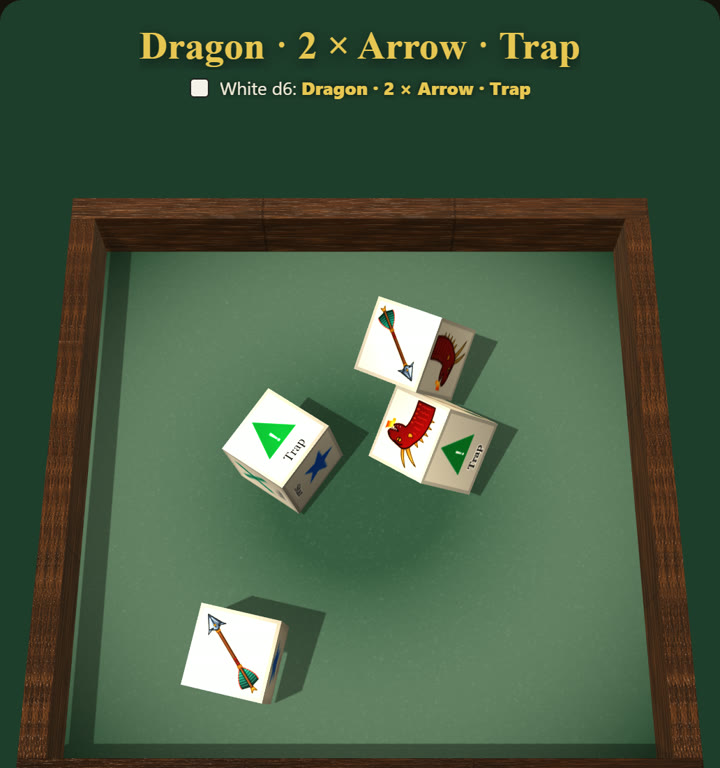
The dice in the picture are a real roll. The dragon and the arrow were uploaded as pictures; the other four faces are Gift, Trap, Miss and Star.
How to make picture dice
- Start here, or open Custom Dice in the roller (the box beside Dice Type) and choose a D2, D3 or D6.
- Tap the big “Upload your own image” button at the top and pick a file from your computer or phone. Each picture goes on the next empty face; tap any face to change it.
- Name your faces. The name under each picture is what your result says, and you choose whether it shows on the face too.
- Roll them. Picture dice are drawn bigger on the tray (with up to four dice), so every detail shows. Save the set and it’s there next time.
Want to see one first? Pick the ready-made Your own designs set in Custom Dice: it loads the six faces below, ready for you to swap in your own.

Ideas for picture dice
- Your party on a die. Each player’s character portrait on a D6, to decide who goes first, who the monster targets or who takes the watch.
- A monster you drew. Sketch it, photograph it, put it on the faces. Children’s drawings make brilliant family dice.
- Reward and event dice. Gift, Trap, Miss, Star — or loot, weather and random encounters as pictures instead of words.
- Your logo. For a games club, a stream, a podcast or a shop: dice in your own branding.
- A coin with your own two faces. The D2 takes a picture on each side.
- Pets, places and in-jokes. If it’s a picture, it can be a face.
Share them with your group
Made a set your group will love? Tap Export on it in Custom Dice and Dice Drop turns it into a small .dicedrop file, pictures and all. Send it however you like — WhatsApp, Messages, email, Discord — and your friends tap Import dice to roll the very same dice on their own phone or computer. The file goes straight from you to them; it never passes through us.
The Story board — free
Want to see what picture dice can do before you draw your own? Open the Story board: three dice that roll a place, a character and a problem — a knight, in a cave, with a lost key — for story games, writing prompts, game masters stuck for an idea, or a bedtime tale. It is free, with six pictures on each die. With Premium you choose your own six for each die from a library of 90 pictures — 30 places, 30 characters and 30 problems — and use them on any picture die.
Your pictures stay yours
Pictures are shrunk in your own browser and kept with your dice set on your device. They are never uploaded to us. When you share a roll to Discord or play in a room, the other players see each face’s title instead of the picture.
Part of Premium
Picture dice come with Premium, a one-off unlock with no subscription, alongside every dice finish and tray, macros, mixed dice pools and up to 20 dice a throw. Try all of it free for 7 days: no card to enter, no account to create, and nothing is charged when the trial ends.
Picture dice work on dicedrop.co.uk in any browser, on a computer, tablet or phone, and in the Dice Drop apps for iPhone and Android.
Questions
What pictures can I use?
PNG, JPG, WebP, GIF, BMP or SVG. A photo straight off your phone is fine: Dice Drop shrinks it to fit a die face for you. Drawings on white or clear backgrounds look best, and only use pictures you have the right to use.
Which dice can carry pictures?
The D2 (a coin), the D3 and the D6. Their faces are big and flat, so a picture and its title are both easy to read. Every other die can still carry your own words.
Do my pictures get uploaded anywhere?
No. Your pictures are shrunk in your own browser and kept with your dice set on your device. They are never sent to us. When you share a roll or play in a room, the other players see each face’s title instead of the picture.
Do picture dice still score?
Yes. Every face keeps its title and a worth, so the result names the faces that came up, the roll history records them, and you can still add the dice up, count successes or keep the highest.
Do pictures change how fair the dice are?
No. A picture changes only how a face looks, not the die’s shape or how it rolls. See the fairness test, where every die was rolled 100,000 times.
Is it free?
Picture dice are part of Premium, a one-off unlock with no subscription. You can try all of Premium free for 7 days, with no card to enter and no account to create.
Can I share my picture dice?
Yes. Tap Export on a set in Custom Dice to make a small .dicedrop file, pictures and all, and send it however you like. Your friends tap Import dice to roll the same dice. The file goes straight from you to them and never passes through our servers.
Does it work in the apps?
Yes. Picture dice work on dicedrop.co.uk in any browser, on a computer, tablet or phone, and in the Dice Drop apps for iPhone and Android.